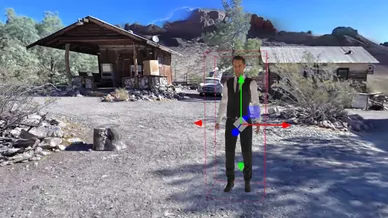
Feature:

Gaussian Splats

Turn photorealistic 3D spaces into interactive experiences.


Upload your Gaussian Splat to MPskin and transform it into a fully interactive 3D tour. Add Virtual Staging, content, branding, password protection and more while giving visitors the freedom to move naturally through the scene.
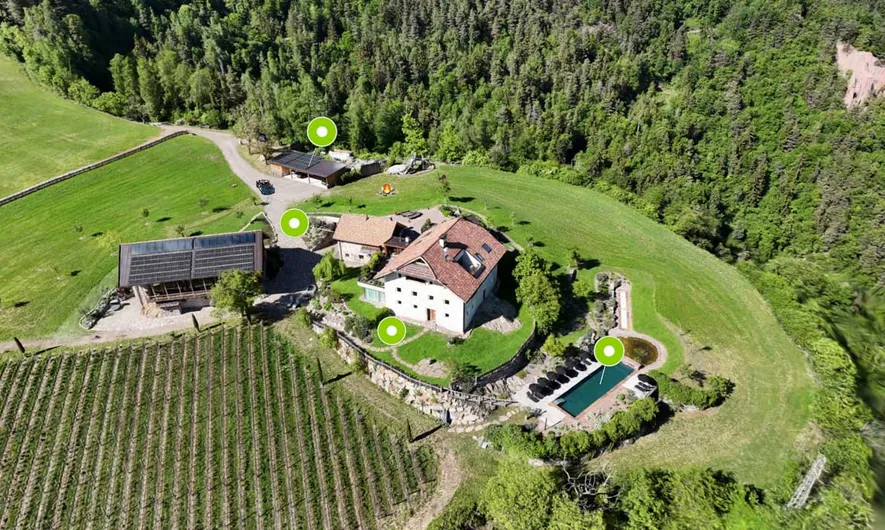

A new way to capture and explore 3D

Gaussian Splats create highly realistic 3D representations of real spaces and objects.

Fine structures, plants, glass, reflections and complex surfaces can appear much more natural than in many traditional 3D workflows, while visitors can move freely through the scene instead of jumping between fixed scan points.

With MPskin, a Gaussian Splat becomes a reusable Space that can be turned into an interactive MPskin tour.


Gaussian Splatting captures the space, MPskin turns it into an experience

Once your Splat has been uploaded and processed, you can enrich it with the same kind of interactive content and presentation tools you already know from MPskin.

Create a Splat with the tools you already use

MPskin does not require a proprietary capture system or dedicated 3D camera.

Gaussian Splats can be created with common apps and software such as Polycam, Scaniverse, Postshot or XGRIDS.

Once your Splat is ready, export it as a .ply file and upload it to MPskin.

Upload once. Use it again.

In MPskin, every Gaussian Splat is stored as a reusable Space.

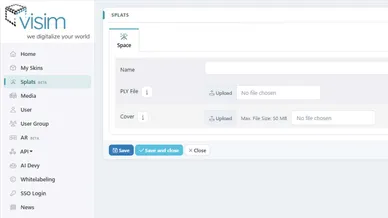
Simply upload your .ply file, give the Space a name and save it, MPskin then automatically processes and optimizes the Splat for web-based viewing.


Once the Space is ready, it can be used to create an MPskin Splat Skin. 
Note that a Skin must be created with the Splat in order to add Tags, VS, a Menu and other features.

Prepare your Space for the real world

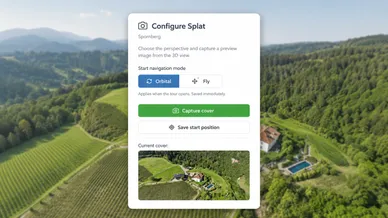
Before creating your tour, MPskin allows you to configure the Splat so that it has the correct orientation, scale and starting view.

  • Align the floor: Select a point on the floor and MPskin automatically levels the scene.
  • Calibrate the scale: Select two points with a known real-world distance and enter the corresponding measurement in meters.
  • Choose the start position: Define the view visitors will see when they first open the tour.
  • Set the cover image: Choose the preview image used for the Space and tour.

Move freely through the scene

Gaussian Splat Tours are not limited to fixed scan points. Visitors can move continuously through the 3D environment and explore the scene from different perspectives. 
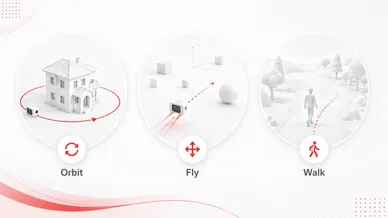
Choose between two navigation modes:

  • Orbital Camera for moving around a scene or object
  • Fly Camera for freely exploring rooms and larger environments
  • Walk Mode for ground-based navigation

You can define the default navigation mode when configuring your Splat, while visitors can switch between both modes during the tour.

Add context with interactive Tags

Turn your Gaussian Splat into an informative, interactive experience.

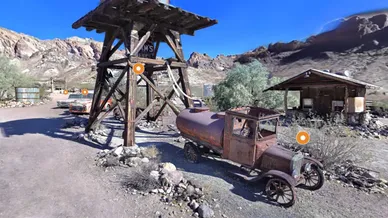
With MPskin Tags, you can place text, images, videos, links and other content directly inside the 3D scene. Use them to explain details, highlight important areas or add additional information exactly where visitors need it.

You can also use Highlight Reels to guide visitors through selected viewpoints and key parts of the Splat.

Add interactive content with Virtual Staging

Go beyond what was captured in the original scene: With MPskin Virtual Staging, you can add 3D models, images, videos and other virtual elements directly inside your Gaussian Splat. 

Use it to present products, visualize ideas, enrich empty spaces or create more engaging interactive experiences.

FAQ about Gaussian Splats

What is Gaussian Splatting?

Gaussian Splatting is a 3D technology for creating highly realistic representations of real spaces and objects. It is especially good at displaying fine details, plants, glass and reflections while allowing visitors to move freely through the scene.

Can I upload Gaussian Splats to MPskin?

Yes. MPskin currently supports Gaussian Splats as .ply files. After upload, the file is automatically processed and optimized for web-based viewing before it can be used as a Splat Tour.

How can I create a Gaussian Splat?

Gaussian Splats can be created with tools such as Polycam, Scaniverse, Postshot, XGRIDS or SuperSplat. In many cases, a modern smartphone is enough to capture the source material.

Once your Splat is ready, export it as a .ply file and upload it to MPskin.

Do I need a special 3D camera?

No. Gaussian Splats can be created using different capture workflows and do not require a proprietary camera system. In many cases, a regular smartphone is sufficient.

The quality of the original capture has a strong influence on the final result.

Can MPskin create a Gaussian Splat directly from a video?

Not yet. Direct video-to-3D processing is currently in development.

At the moment, the Gaussian Splat is created externally and uploaded to MPskin as a finished .ply file.

How can visitors navigate through a Splat Tour?

Visitors can move freely through the scene instead of jumping between fixed scan points.

MPskin currently supports Orbit and Fly navigation. A third Walk mode is currently in development and will be added soon.

The creator can define the default navigation mode when configuring the Splat.

What can I add to a Gaussian Splat with MPskin?

You can enrich your Splat Tour with a range of interactive MPskin features. Add Tags with text, images, videos, links and other content, use Virtual Staging to place 3D models, media and additional Splat objects directly inside the scene, and create Highlight Reels to guide visitors through selected viewpoints and important areas.

This allows you to turn a photorealistic 3D capture into a richer, more interactive and structured experience.

Can I use branding, White Label and password protection?

Yes. Splat Tours can use MPskin features such as Corporate Design, White Label, password protection, sharing, embedding and statistics, depending on the functionality available in your MPskin account.

Why can't my team member see the Splats menu?

For sub-users, access to Splats must be enabled in the corresponding User Group.

The Splat permission is disabled by default and can be activated by the account owner in the User Group settings.

How much does using Splats cost?

Gaussian Splats in MPskin are generally available on ALL plans without additional costs.
However, the file size of the Splat will be counted towards the total available storage space in your account - so be sure to keep an eye on your available storage space.


Additional storage space can be purchased. 

Why is my Splat link not viewable externally?

After uploading and setting up your Splat in the Splats tab, you still need to create a Splat Skin before you can use or share it.

The link available directly in the Splats tab is only used internally and is not intended as a public share link.

To create a usable Splat Tour, go to My Skins and select New Splat Tour, then choose the Splat you want to use.

Once the Splat Skin has been created, you can add MPskin features such as Tags, Virtual Staging, menus, Highlight Reels and more, and use the Skin link as your shareable tour URL.

Start your creative journey with MPskin!